Stacks and Queues
What is a Stack
- A stack is a data structure that consists of
Nodes. EachNodereferences thenext Nodein thestack, but does not reference its previous.
Common terminology for a stack
- Push: Nodes or items that are put into the stack are pushed
- Pop: Nodes or items that are removed from the stack are popped. When you attempt to pop an empty stack an exception will be raised.
- Top: This is the top of the stack.
- Peek: When you peek you will view the value of the top Node in the stack. When you attempt to peek an empty stack an exception will be raised.
- IsEmpty: returns true when stack is empty otherwise returns false.
Stacks follow these concepts
- FILO:
First In Last Out,this means that the first item added in the stack will be the last item popped out of the stack. - LIFO:
Last In First Out,this means that the last item added to the stack will be the first item popped out of the stack.
Stack Visualization
example of what a stack looks like:
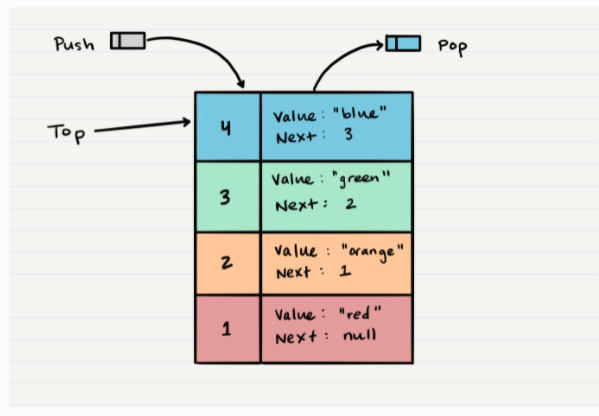
- As you can see, the topmost item is denoted as the
top. When youpushsomethingto the stack, it becomes thenew top. When youpopsomethingfrom the stack, youpopthecurrent topand set thenext topastop.next.
Push O(1)
-
Pushing a Node onto a stack will always be an
O(1)operation. This is because it takesthe same amount of timeno matter how manyNodes (n)you have in the stack. -
When
adding a Node, youpushit into the stack by assigning it as thenew top, with its next property equal to the original top.
How push work
- First, you should have the Node that you want to add.
- Next, you need to assign the
next propertyof the added Node to reference the same Node that top is referencing - Your new Node is added to your stack, but there is no indication that it is the first Node in the stack. To make this happen, you have to re-assign our reference top to the newly added Node.
- Now it’s completed a successfully push of the new Node onto the stack.
Here is the pseudocode to push a value onto a stack:
ALOGORITHM push(value)
// INPUT <-- value to add, wrapped in Node internally
// OUTPUT <-- none
node = new Node(value)
node.next <-- Top
top <-- Node
Pop O(1)
-
Popping a Nodeoff a stack is theaction of removing a Node from the top. When conducting a pop, the top Node will be re-assigned to the Node that lives below and the top Node is returned to the user. -
You would check
isEmptybefore conducting apop.
How pup work
- The first step of removing the
Nodefrom the stack is to create a reference namedtempthat points to thesame Nodethattoppoints to. - Once you have created the new reference type, you now need to
re-assign topto the value that thenext propertyis referencing. - We can now remove the
Nodesafely without it affecting the rest of the stack.Before we do that though you may want to make sure that you clear out thenext propertyin your current temp reference. - Return the value of the
temp Nodethat was just popped off.
Here is the pseudocode for a pop
ALGORITHM pop()
// INPUT <-- No input
// OUTPUT <-- value of top Node in stack
// EXCEPTION if stack is empty
Node temp <-- top
top <-- top.next
temp.next <-- null
return temp.value
Peek O(1)
-
When conducting a
peek, you will only be inspecting the top Node of the stac -
You would check
isEmptybefore conducting apeek. This will ensure that an exception is not raised. Alternately, you can wrap the call in a try/catch block.
Here is the pseudocode for a peek
ALGORITHM peek()
// INPUT <-- none
// OUTPUT <-- value of top Node in stack
// EXCEPTION if stack is empty
return top.value
IsEmpty O(1)
Here is the pseudocode for isEmpty
ALGORITHM isEmpty()
// INPUT <-- none
// OUTPUT <-- boolean
return top = NULL
What is a Queue
Common terminology for a stack
- Enqueue: Nodes or items that are added to the queue.
- Dequeue: Nodes or items that are removed from the queue. If called when the queue is empty an exception will be raised.
- Front: This is the front/first Node of the queue.
- Rear: This is the rear/last Node of the queue.
- Peek: When you peek you will view the value of the front Node in the queue. If called when the queue is empty an exception will be raised.
- IsEmpty: returns true when queue is empty otherwise returns false.
Queues follow these concepts
- FILO:
First In Last Out,This means that the first item in the queue will be the first item out of the queue. - LIFO:
Last In First Out,This means that the last item in the queue will be the last item out of the queue.
Queue Visualization
example of what a stack looks like:
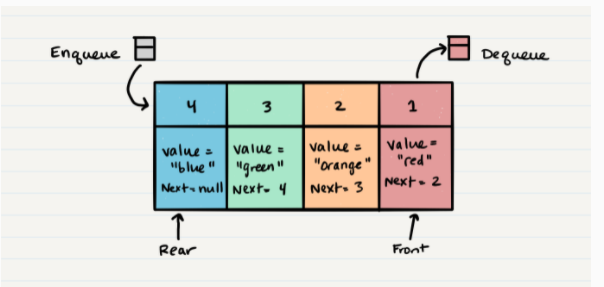
Enqueue O(1)
- When you add an item to a
queue, you use theenqueue action. This is done with anO(1)operation in time because it does not matter how many other items live in thequeue (n); it takes the same amount of time to perform the operation.
How Enqueue work
1.First, we should change the next property of current Node to point to the new Node we are adding.
Following the rules of reference types, this means that we must change
rear.nexttonew Node
- After we have set the
next property, we canre-assign the rearreference to point tonew Node. By doing this, it allows us to keep a reference of where the rear is, and we can continue to enqueue Nodes into the queue as needed. - It’s successfully added a Node to a queue by activating the enqueue action.
Here is the pseudocode for the enqueue method
ALGORITHM enqueue(value)
// INPUT <-- value to add to queue (will be wrapped in Node internally)
// OUTPUT <-- none
node = new Node(value)
` rear.next <– node`
rear <-- node
Dequeue O(1)
-
When you
removean item from aqueue, you use thedequeue action. This is done with anO(1)operation in time because it doesn’t matter how many other items are in the queue, you are always just removing thefront Nodeof the queue. -
you would check
isEmptybefore conducting a dequeue. This will ensure that an exception is not raised. Alternately, you can wrap the call in a try/catch block..
How Dequeue work
- The first thing you want to do is create a
temporary reference type named tempand have it point to thesame Nodethatfrontispointingtoo. - Next, you want to
re-assign frontto thenext valuethat theNode frontis referencing. - Now that we have moved
front to the second Node in line, we can nextre-assign the next property on the temp Node to null. - Finally, we
returnthe value of thetemp Nodethat was just removed. - It’s successfully completed a dequeue action on a queue!
Here is the pseudocode for the dequeue method
ALGORITHM dequeue()
// INPUT <-- none
// OUTPUT <-- value of the removed Node
// EXCEPTION if queue is empty
Node temp <-- front
front <-- front.next
temp.next <-- null
return temp.value`
Peek O(1)
-
When conducting a
peek, you will only be inspecting thefront Nodeof the queue. -
You would check
isEmptybefore conducting apeek. This will ensure that an exception is not raised. Alternately, you can wrap the call in a try/catch block.
Here is the pseudocode for a peek
ALGORITHM peek()
// INPUT <-- none
// OUTPUT <-- value of the front Node in Queue
// EXCEPTION if Queue is empty
return front.value
We do not
re-assign the next propertywhen wepeekbecause we want tokeepthe reference to thenext Nodein the queue. This will allow thefrontto stay in the front until we decide to dequeue
IsEmpty O(1)
Here is the pseudocode for isEmpty
ALGORITHM isEmpty()
// INPUT <-- none
// OUTPUT <-- boolean
return front = NULL
References:
@By Code Fellows/Stacks and Queues