Context API
Describe use cases useState() vs useReducer()
- Although
useStateis a Basic Hook for managing simple state transformation anduseReduceris an Additional Hook for managing more complex state logic, it is worth noting thatuseStateuses theuseReducerinternally. This implies that you could useuseReducerfor everything you can do withuseState. useReducerlets you avoid passing down callbacks through different levels of your component, instead allowing you to pass a provided dispatch function, which in turn will improve performance for components that trigger deep updates.And this does not imply that theuseStateupdater function.
Why do custom hooks need the use prefix?
- Custom hooks are normal JS functions, named with the prefix
use, that can use hooks inside of it and contain a common stateful logic to be reused in other components.
What do custom hooks usually do?
- Custom hooks allow us to have cleaner functional components, remove logic from the UI layer, and prevent code duplication by bringing common use cases to reusable hooks.
Using any list of custom hooks, research and name one that you think will be useful in your applications
- react-use-form-state hook:
-
Forms are everywhere, even in the smallest of applications we have to encounter forms and manage their state. Managing form state in React can be a bit unwieldy sometimes.
-
react-use-form-stateis a small React Hook that attempts to simplify managing form state, using the native form input elements you are familiar with. - Installation:
npm i react-use-form-state
- Usage:
-
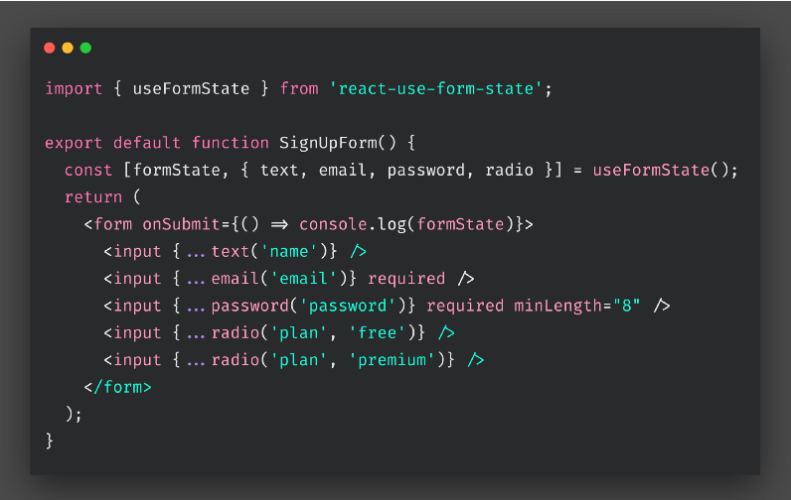
Describe how a hook that fetches API data might work
- Import useEffect
import React, { useEffect } from "react"
-
Then, define your useEffect hook inside of your component. import React, { useEffect } from “react”;
const App = () => { useEffect(() => { }, []); return <div></div>; }; export default App; -
Define your URL
 useEffect(() => {

     const url = "https://api.adviceslip.com/advice"

 }, []);
4.Create the asynchronous function
const fetchData = async () => {

    try {
        const response = await fetch(url);
        const json = await response.json();
        console.log(json);
        } catch (error) {
        console.log("error", error);
        }
};
-
Put the fetchData function above in the useEffect hook and call it, like so:
 useEffect(() => {
     const url = "https://api.adviceslip.com/advice";

     const fetchData = async () => {
     try {
         const response = await fetch(url);
         const json = await response.json();
         console.log(json);
     } catch (error) {
         console.log("error", error);
     }
     };

     fetchData();
 }, []);
The function we just created is wrapped in a try…catch statement so that the function catches the errors and prints them in the console. This helps debug and prevents the app to crash unexpectedly.
Terms
- reducer :
reduceris a function that determines changes to an application’sstate. It uses the action it receives to determine this change. We have tools, like Redux, that help manage an application’s state changes in a single store so that they behave consistently.
context api
- Context provides a way to pass data through the component tree without having to pass props down manually at every level.
When to Use Context
Contextis designed to share data that can be consideredglobalfor a tree of React components, such as the current authenticated user, theme, or preferred language.
Before You Use Context
-
Context is primarily used when some data needs to be accessible by many components at different nesting levels. Apply it sparingly because it makes component reuse more difficult.
-
If you only want to avoid passing some props through many levels, component composition is often a simpler solution than context.
API
React.createContext:- Creates a Context object. When React renders a component that subscribes to this Context object it will read the current context value from the closest matching
Providerabove it in the tree.ThedefaultValueargument is only used when a component does not have a matching Provider above it in the tree.
- Creates a Context object. When React renders a component that subscribes to this Context object it will read the current context value from the closest matching
-
Context.Provider:<MyContext.Provider value={/* some value */}>- Every
Context objectcomes with aProviderReact component that allows consuming components to subscribe to context changes.TheProvider componentaccepts avalue propto be passed to consuming components that are descendants of this Provider.
- Every
-
Class.contextType:-
The
contextType propertyon a class can be assigned aContext objectcreated by React.createContext(). Using this property lets you consume the nearest currentvalueof that Context type usingthis.context. You can reference this in any of the lifecycle methods including the render function.class MyClass extends React.Component { componentDidMount() { let value = this.context; /* perform a side-effect at mount using the value of MyContext */ } componentDidUpdate() { let value = this.context; /* ... */ } componentWillUnmount() { let value = this.context; /* ... */ } render() { let value = this.context; /* render something based on the value of MyContext */ } } MyClass.contextType = MyContext;
-
-
Context.Consumer:-
A React component that subscribes to context changes. Using this component lets you subscribe to a context within a function component.
<MyContext.Consumer>
{value => /* render something based on the context value */}
</MyContext.Consumer>
-
-
Context.displayName:-
Context object accepts a displayName string property. React DevTools uses this string to determine what to display for the context.
const MyContext = React.createContext(/* some value */);
MyContext.displayName = 'MyDisplayName';

<MyContext.Provider> // "MyDisplayName.Provider" in DevTools
<MyContext.Consumer> // "MyDisplayName.Consumer" in DevTools
-
References:
@By wix engineering/Custom React Hook: When Software Design Meets React Hooks
@By Toby Rogers/Top 10 Custom React Hooks you Should Have in Your Toolbox
@By designcode/Fetch Data from an API